
TCP / IP Courses and Certifications
Since ’81, IPv4 has been the backbone of communication on both the internet and private networks. Take a deep dive into the services and protocols in the stack.
TCP / IP Courses
Networking Fundamentals
TCP/IP InternetWorking
Implementing and Administering Cisco Solutions – Part 2
Implementing and Administering Cisco Solutions – Part 1


TCP / IP learning path
TCP/IP in brief
TCP/IP
IP = Internet Protocol
Everything sent and received on the internet is IP packets. An IP packet states where it comes from (the sender IP address) and where it is going (the recipient IP address).
TCP = Transmission Control Protocol
When you send an email or load a web page, the data is split into a number of IP packets (the data typically cannot fit in a single IP packet). TCP's job is to resend packets that are lost and to make sure the individual packets are reassembled in the right order at the recipient.
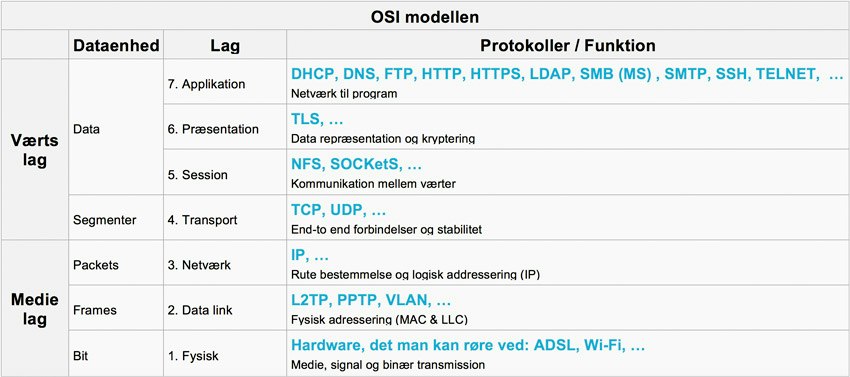
The OSI model: The protocol layers
The protocols are organized into ordered layers, with each layer handling its own task.
The OSI model shows these seven layers.
Some of the best-known protocols in the host layers (layers 4 to 7)
DHCP (Dynamic Host Configuration Protocol)
DHCP is used to “get a device onto the network”.
The protocol assigns a host on a network a unique IP address, subnet mask and default gateway, which makes it possible for that host to send packets through the network.
It can also hand out other information that makes day-to-day work easier, such as the DNS server's IP address and the domain name.
DNS (Domain Name Services)
DNS is used to translate between names and IP addresses, for example from www.superusers.dk to 212.98.70.130.
In other words, if you know the name of a host, you can find its IP address, and if you know an IP address, you can find the name of the host that owns that address.
FTP (File Transfer Protocol)
File transfer!
FTP is a protocol for transferring files between a server and a host. FTP can be tricky to set up if one of the machines is behind a NAT device. There can also be a problem if a username and password are used, since these are sent in clear text.
HTTP/HTTPS (Hyper Text Transfer Protocol)
Communication between web server and web browser, transfer of HTML documents and the like.
HTTP is used to transfer pages on the World Wide Web and is probably the most widely used protocol on the internet. HTTPS serves the same purpose as HTTP, but with HTTPS the data is encrypted so others cannot read its contents.
IMAP (Internet Message Access Protocol)
Email protocol, used to retrieve email from a server to a client.
Together with POP3, IMAP is one of the most widely used protocols for retrieving email from a remote server. All email clients and servers support IMAP today. With IMAP, several clients can be connected to the same mailbox at the same time.
NFS (Networking File System)
File sharing, often between different operating systems.
NFS is a distributed file system protocol that lets users access files stored on a server. Today NFS uses TCP as its transport protocol and is typically implemented on UNIX and Linux, but Windows can also use NFS.
POP3 (Post Office Protocol 3)
Email protocol, used to retrieve email from a server to a client.
Together with IMAP, POP3 is one of the most widely used protocols for retrieving email from a remote server. All email clients and servers support POP3 today.
SSH (Secure Shell)
Encrypted data transfer over TCP.
Secure Shell is used to encrypt data sent over the network, for example to encrypt a Telnet connection or any other TCP connection.
Telnet (Telnet):
Protocol for when you need a text-based login over the network.
Telnet is a two-way communication protocol often used to remotely control text-based consoles. Be aware that user authentication is sent in clear text.
The protocols above sit in layers 5-7 (the data layers); below are TCP and UDP, which sit in layer 4 (the transport layer).
TCP (Transmission Control Protocol)
TCP is a protocol for guaranteed delivery of data. This works by establishing a session between sender and receiver, which then checks that all data sent has been received; if it has not, the missing data is retransmitted.
UDP (User Datagram Protocol)
UDP is a non-guaranteed data transfer, mostly used for streaming data (for example audio and video), where a steady flow of data matters more than all of the data reaching the receiver.
Other higher-layer protocols also use UDP, most often to save packets on the network.
Some of the best-known protocols in the media layers (layers 1 to 3)
The IP protocol is on layer 3, the network layer.
IP (Internet Protocol)
Everything that is physically sent across the internet is IP packets. These packets travel back and forth according to the set of rules described in the IP protocol. Everything is therefore converted into a number of IP packets before it goes out on the network.
The IP protocol is used to give a host a unique address on a network, making it possible for 2 machines to communicate.
IP addresses are structured so that you can look at part of the address and determine which way the packet should be sent (a bit like postal codes).
This brings us down to layer 2, the data link layer.
L2TP (Layer 2 Tunneling Protocol)
L2TP is (like PPTP) a method for establishing a VPN connection
With L2TP, the tunnel can be authenticated. Data in the tunnel is not encrypted, but it can be encrypted using the IPSec protocol.
The L2TP packet is encapsulated in a UDP packet with port number 1701.
PPTP (Point-to-Point Tunneling Protocol)
PPTP is (like L2TP) a method for establishing a VPN connection.
This is done over a TCP control connection, and a Generic Routing Encapsulation (GRE) tunnel is created. PPTP does not specify authentication or encryption, but Microsoft operating systems have built-in authentication and encryption.
Now we have reached all the way down to what you can actually touch.
The Physical Layer
The physical layer consists of cables, connectors, network cards and signals through the air (laser, radio waves). This is where a serial bit stream is transmitted, and you cannot immediately tell which protocol is being sent across the network. For example, the first 64 bits are used only to synchronize the speed of the sender and the receiver.
Free course advice
It matters a great deal to us that you find the course that creates the most value for you and your workplace. Take a few minutes to call or write to our advisors, who are ready to help with technical guidance, free of charge and with no obligation.